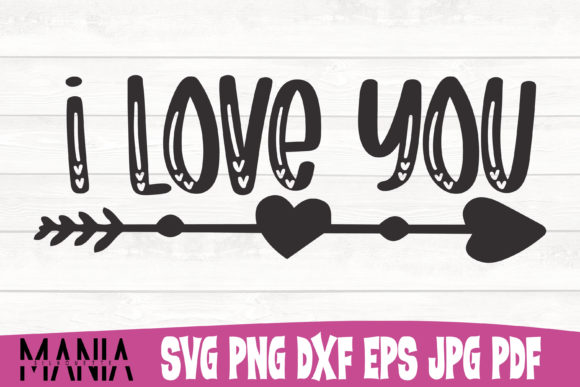
Evaluating the I Love You SVG Cut File for Crafting Projects
The I Love You SVG Cut File is a digital design asset specifically formatted for electronic cutting machines and graphic design software. For crafters, DIY enthusiasts, and small business owners, selecting the right digital file is as critical as choosing the physical materials for a project. This specific pack provides a comprehensive suite of file formats intended to bridge the gap between digital design and physical production. Understanding the technical specifications, practical applications, and limitations of this asset allows users to determine if it aligns with their current workflow and creative objectives.
Understanding the File Composition
When evaluating digital cut files, the variety of included formats dictates the versatility of the asset. This pack is structured to support multiple stages of the creation process, from initial editing to final production. The inclusion of six distinct file types addresses different technical requirements:
- SVG Files: The primary format for cutting machines like Cricut Design Space and Silhouette Studio. These vector-based files maintain crisp edges at any scale and preserve layer information for multi-color projects.
- PNG Files: Provided with a transparent background, these raster images are essential for sublimation printing, web graphics, or overlaying onto complex backgrounds where vector paths are unnecessary.
- EPS Files: A standard vector format compatible with professional editing software such as Adobe Illustrator. This allows designers to modify nodes, adjust typography, or integrate the design into larger commercial layouts.
- JPEG Files: Optimized for iron-on transfers and print-then-cut applications where a solid background or specific color profile is required for heat press machinery.
- DXF Files: Specifically useful for users of the free version of Silhouette Studio, which does not natively support SVG imports without an upgrade. DXF ensures accessibility for entry-level users.
- PDF Files: Serves as a reference sheet containing all clip art in one document, facilitating easy visual organization and selection before importing into production software.
Technical Quality and Scalability
A primary consideration when acquiring digital assets is the integrity of the vector paths. Poorly digitized files often contain open nodes, overlapping layers, or excessive anchor points that cause cutting machines to stutter or fail. The I Love You SVG Cut File is described as having meticulously organized layers that have been continuously tested. For the end-user, this translates to reduced preparation time. Clean layers mean less time spent welding, attaching, or repairing paths in design software and more time focused on material application.
Scalability is another significant factor. Because the core files (SVG, EPS, DXF) are vector-based, they possess infinite expandability. This characteristic allows the same design file to be used for disparate projects without loss of fidelity. A user can resize the artwork for a delicate baby onesie or expand it for large-scale wall decals or signage without pixelation. This flexibility removes the need to purchase multiple size variations of the same design, streamlining asset management for creators who work across different product categories.
Software and Hardware Compatibility
Compatibility determines whether a digital asset is usable within an existing ecosystem. This pack supports a broad spectrum of industry-standard tools. For hardware, it integrates with major cutting platforms including Cricut Explore, Silhouette Studio, Make The Cut, and Sure Cuts A Lot. This wide hardware support ensures that users are not locked into a single machine manufacturer.
On the software side, compatibility extends beyond cutting interfaces to include Adobe Illustrator, Photoshop, Flash, After Effects, and various 3D editing programs. This cross-platform functionality is particularly relevant for professionals who may need to incorporate the "I Love You" motif into video content, 3D renders, or complex print layouts. However, users should verify their specific software version supports standard SVG or EPS imports, as legacy versions may require format conversion.
Practical Applications and Use Cases
The I Love You SVG Cut File is best suited for projects requiring sentimental expression with professional finish. Common applications include:
- Apparel Customization: Using HTV (Heat Transfer Vinyl) or sublimation for t-shirts, hoodies, and baby garments.
- Paper Crafting: Intricate card making, scrapbooking, and gift tags where layered paper adds depth.
- Home Decor: Wood signs, acrylic plaques, and window clings.
- Personalized Gifts: Mugs, tumblers, and keychains utilizing adhesive vinyl or laser engraving.
The organized nature of the layers makes this file particularly strong for multi-media projects. For example, a crafter could use the SVG for a vinyl base layer and the PNG for a printed overlay, combining techniques that require precise alignment.
Considerations and Tradeoffs
While comprehensive, potential users must weigh specific tradeoffs. The primary consideration is licensing. Digital cut files typically come with personal-use-only licenses unless a commercial license is explicitly purchased. Users intending to sell finished products made with this I Love You SVG Cut File must verify the terms of use to avoid intellectual property infringement.
Additionally, while the files are compatible with many programs, the learning curve varies. Users new to Adobe Illustrator may find the EPS file powerful but intimidating compared to the plug-and-play nature of the SVG in Cricut Design Space. Conversely, advanced users might find the pre-set layers restrictive if they prefer to build designs from scratch. The "organized layers" feature is a benefit for efficiency but can be a limitation for those seeking total structural freedom.
File management also requires attention. With six different formats per design, storage organization becomes necessary. Users should establish a consistent naming convention and folder structure to prevent confusion between the editable EPS and the cut-ready SVG.
Determining Fit: When to Choose This Pack
This asset collection is a strong fit for creators who value convenience and cross-format utility. If you frequently switch between cutting machines and graphic design software, or if you require both vector and raster versions of the same artwork, this all-in-one pack reduces friction. It is also ideal for users who lack advanced vectorization skills, as the pre-tested layers eliminate the need for manual tracing or cleanup.
However, alternatives may be worth considering in specific scenarios. If you only own a basic cutting machine and never intend to edit the design digitally, a standalone SVG or DXF file might be more cost-effective than a premium multi-format pack. Similarly, if you require a highly customized typographic treatment, hiring a custom lettering artist or using font software to create a unique layout may yield better results than adapting a pre-made clip art file. Finally, for users strictly engaged in commercial mass production, verifying that the license permits high-volume sales is mandatory; otherwise, commissioning exclusive artwork may be the safer long-term business decision.
Making an Informed Decision
Selecting the right digital asset involves balancing technical capability with creative intent. The I Love You SVG Cut File offers a robust solution for makers who need reliability, scalability, and format diversity. By providing tested vectors alongside raster options, it supports a wide range of production methods from iron-on transfers to professional graphic design. Evaluating your specific hardware, software proficiency, and licensing needs against these features will determine whether this pack serves as a valuable addition to your digital library or if a more specialized alternative better suits your current project goals.